

Exporting attendee data is a short job: open your registration or ticketing tool, find the attendee or order report, choose CSV, and download it. The harder part is knowing which fields to pull, checking that the file is complete, and handling it safely afterward. The best way to avoid the whole problem is to run your event on a platform where the attendee list belongs to you from day one. That is how we built Actickety: you keep 100% ownership of your event data, so the export is yours whenever you need it.
This guide is for organizers of every size: charities, clubs, schools, musicians, workshop hosts and festival teams. It covers the routine step by step, the problems that come up, and the privacy basics for the United States and beyond.
TL;DR
- Export from the attendee, guest or order report, and choose CSV, which opens in any spreadsheet and imports into almost any other tool.
- Pull only the fields you will use: name, email, ticket type, order number, check-in status and any custom answers.
- Check the file before you rely on it: count rows against your sales total, scan for blanks and duplicates, and look at special characters.
- Treat the file as personal data: limit who has it, protect it with a password or access control, and delete old copies.
- Choose a platform where you own the data, so the export never depends on a vendor's goodwill.
Table of Contents
- What "attendee data" actually includes
- How to export attendee data, step by step
- Can you export before the event, or only after?
- How to check the file before you trust it
- What to do when fields or records are missing
- What the law says about exporting and sharing the data
- Storing and sharing the file safely
- Putting the data to work
- Why we say: the list belongs to you
- Run your event where the data is yours
- FAQ
- Sources
What "attendee data" actually includes
Most people think of a name and an email address. A real export can hold much more, and it helps to know the categories before you decide what to download.
- Identity and contact: first and last name, email, sometimes phone number or postal code.
- Order details: order number, purchase date, ticket type, price paid, discount code used, merchandise bought.
- Attendance: checked in or not, check-in time, entry gate or session.
- Custom answers: dietary needs, accessibility requests, t-shirt size, team name, how they heard about the event.
Each category serves a different job. Contact fields drive your emails. Order fields reconcile your money. Attendance fields tell you who actually came, which is the number sponsors, schools and funders usually ask about. Custom answers keep the day running smoothly.
How to export attendee data, step by step
The menu names differ from tool to tool, but the routine is the same everywhere.
1. Find the right report
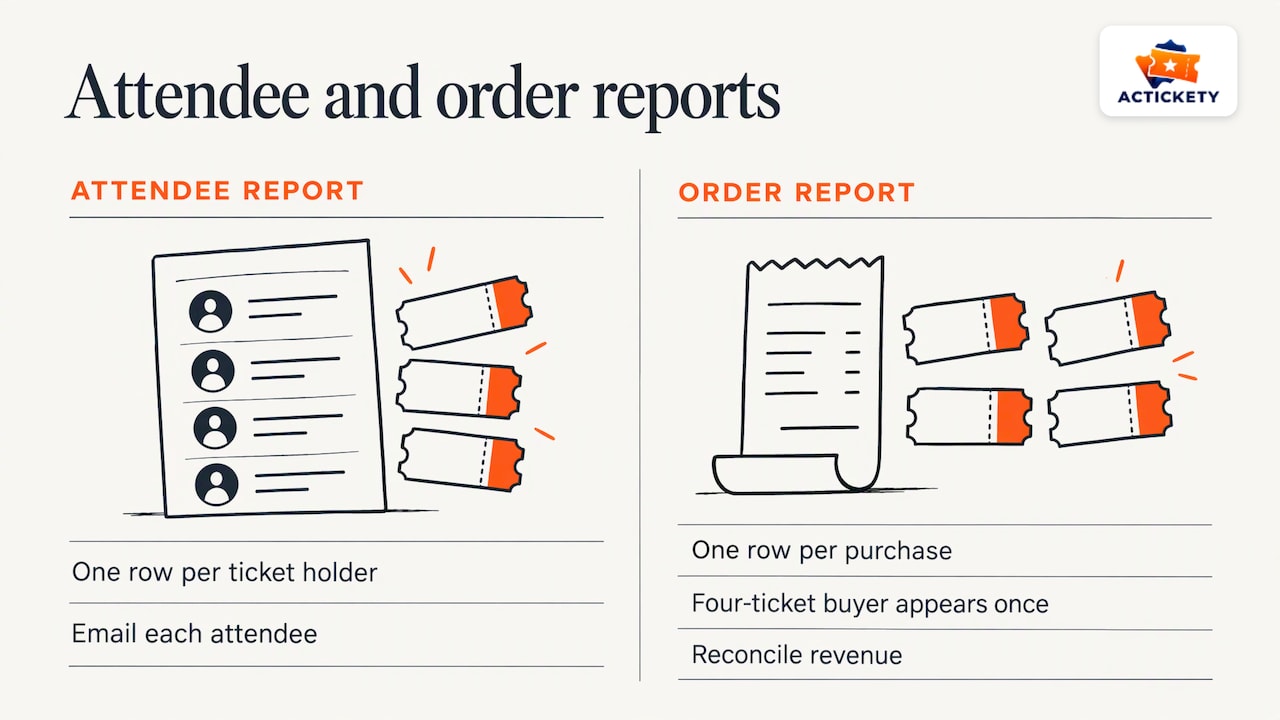
Look for words like Attendees, Guests, Registrations, Orders or Reports. Be careful to choose the right one. An order report has one row per purchase, so a buyer of four tickets appears once. An attendee report has one row per ticket holder. If you want to email every person who is coming, you need the attendee view. If you are reconciling revenue, you need the order view.
2. Set your filters before you download
Filter by ticket type, date range, payment status or check-in status. Exporting everything and trimming it later is how refunded or unpaid registrations end up on a mailing list. Decide up front whether you want paid tickets only.
3. Pick the columns
If the tool lets you choose fields, take only what you need. A smaller file is easier to check and safer to share. If you only need to send a reminder, name, email and ticket type are enough. Leave out phone numbers and answers to sensitive questions unless a task requires them.
4. Choose the format
CSV (comma-separated values) is a plain text file where each row is a person and each column is a field. It is the safe default. Spreadsheet formats like XLSX keep formatting but are less portable. Some tools also offer JSON, a structured format meant for developers and archives. Unless you are feeding the data to software, choose CSV.
5. Download and rename the file
Give the file a name you will understand in a year: event name, what it contains and the date, for example spring-gala-attendees-2026-11-23.csv. The tool's default name rarely tells you anything.
6. Open it carefully
Double-clicking a CSV in a spreadsheet works, but spreadsheets can quietly damage data. Long numbers become scientific notation, leading zeros vanish from ZIP codes and phone numbers, and some names turn into dates. If you see this, import the file instead of opening it: in most spreadsheets, use the option to import text or CSV, and set the ZIP code and phone columns to text.
Can you export before the event, or only after?
You can usually export at any time. Registration data exists the moment someone buys a ticket, so a list pulled the day before the event is the normal way to prepare check-in sheets, badge printing and last-minute emails. Check-in status, though, only fills in as people arrive, so a complete attendance record is something you pull after the event.
A practical rhythm for most organizers:
- One week out: export to check numbers, catering counts and accessibility requests.
- Day before: export a final list for the door as a backup to scanning. If you use QR tickets, our guide on setting up and scanning QR codes for tickets covers the door side.
- Day after: export again with check-in status, for your thank-you email and your report.
One caution: an export is a snapshot. Anyone who buys or cancels afterward is not in your file, so always re-export instead of editing an old copy.
How to check the file before you trust it
A download that looks fine can still be wrong. Run these five checks, which take about ten minutes.
- Count the rows. Compare the number of rows with the tickets sold in your sales dashboard. If one is an order report and one is an attendee report, expect them to differ, and know why.
- Check the money. Add up the price column and compare it with the payout or sales total. Discount codes and refunds are the usual reasons for gaps.
- Look for blanks. Sort each important column. Empty email cells mean those people cannot be reached. If you sold tickets with one buyer per group, the other guests may have no email at all, which is normal.
- Look for duplicates. Sort by email. The same person appearing twice may be a double purchase or a typo. Decide which, and do not just delete.
- Scan special characters. Names with accents or apostrophes sometimes show as garbled symbols. That is an encoding problem. Re-import the file and choose UTF-8 as the encoding.
For events where headcount matters, such as a school open day or a charity dinner with a seated plan, do the row count twice, once from the export and once from your own records.
What to do when fields or records are missing
This is the most common frustration, and it has a few predictable causes.
- The field was never collected. You cannot export an answer nobody was asked for. Add the question to your registration form before sales open. Adding it later means earlier buyers have no answer.
- A filter is hiding rows. Check that the status filter is not set to "checked in" or "paid" only, and the date range covers your whole sales period.
- Orders versus attendees. Group purchases may list only the buyer. Ask the buyer to supply guest names, or collect each guest's name at checkout.
- The export is capped or paged. Some tools limit the rows per download. If your count stops at a round number, such as 500 or 1,000, look for a second page or a date-range split.
- The tool does not offer the field at all. This is a platform limit, and it is the best argument for choosing a system that treats the data as yours. See our piece on what organizers must control about event data.
When the data you need is missing, write down what is absent and why before you contact anyone. It speeds up the answer.
What the law says about exporting and sharing the data
The rules depend on where your attendees live, not just where you are. A few points apply widely.
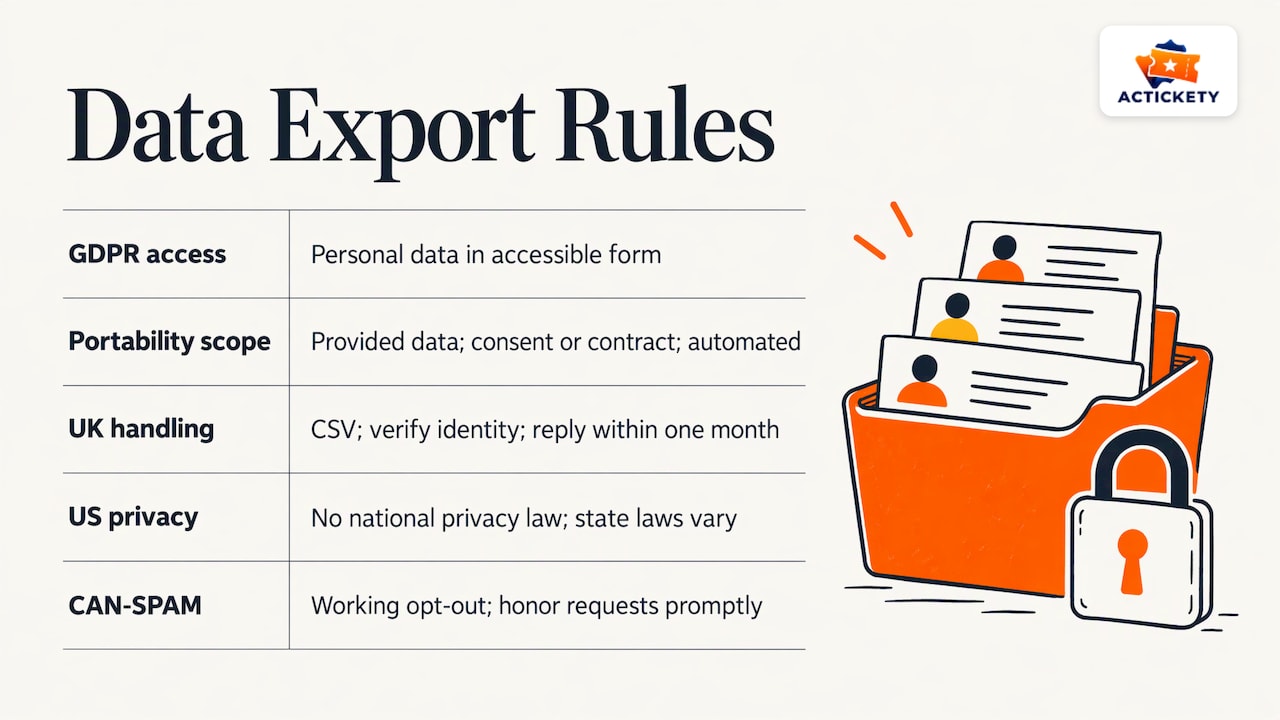
Under the EU's GDPR, people have a right of access to the personal data you hold about them, and you must give it in a concise, transparent, intelligible and easily accessible form, as set out in the regulation text published by EUR-Lex. If you sell to attendees in Europe, expect requests like this.
On portability, one UK council's published policy explains the idea in plain terms: it applies to data a person provided, handled on the basis of consent or a contract, and processed automatically. Qualifying data should be supplied in a structured, commonly used, machine-readable format such as CSV, and the organization should verify the requester's identity by reasonable means and respond within one month, according to that council's data rights policy. Ticket buyers are a clear example: they gave you their details to buy a ticket. Being able to export a clean CSV makes such a request a five-minute task. Event technology providers face the same kind of requests, as described in this look at privacy controls for event data.
In the United States, there is no single national privacy law for attendee lists, and state laws such as California's apply depending on your size and activity. If you are a small organizer, ask a lawyer or your organization's counsel which state rules cover you, particularly if you are a business selling to large numbers of people.
For email, the FTC's CAN-SPAM compliance guide applies to commercial messages in the US. It requires, among other things, a working opt-out method, and it requires you to honor opt-out requests promptly. Buying a ticket gives you a clear reason to email people about that event. It is not a license to hand their addresses to a sponsor. Keep the list for what the attendee reasonably expects. Our guide to event email marketing under current inbox rules shows how to build the sequence around that.
Storing and sharing the file safely
An attendee export is a list of real people. Treat it like cash.
- Keep one master copy in a shared drive with access limited to named people, not in email attachments or personal desktops.
- Share the smallest version. A volunteer running check-in needs names and ticket types, not phone numbers and payment details. Make a trimmed copy for them.
- Protect the file. Use a password or an access-controlled link, and send the password by a different channel.
- Guard against formula tricks. If a field starts with
=,+,-or@, a spreadsheet may treat it as a formula. The OWASP testing guide explains this risk, called CSV injection. If a registrant typed something odd into a name field, review it before opening the file in a spreadsheet. - Delete on a schedule. Decide how long you need the data, for example until your post-event report is done, then delete exports and remove access. Keep only what the law or your funders require.
- Log who has it. A simple note listing who received a copy and when makes any later question easy to answer.
Putting the data to work
An export is only useful if it leads somewhere. Three uses pay off for nearly every organizer:
- Thank-you and next-event email. Attendees are your warmest audience. Pull the post-event list and send one message within a few days.
- Sales analysis. Look at ticket types, purchase dates and discount codes to learn when people buy and what works. We cover that in what to track in ticket sales analytics.
- Reporting. Schools, clubs and charities often need a number for funders or sponsors: how many attended, how many were new, how many bought merchandise.
If you track traffic to your event page as well, our GA4 setup guide for organizers shows how to connect visits to ticket sales.
Why we say: the list belongs to you
Every organizer we build for has the same quiet worry: what happens to my audience if I leave this tool? Your attendee list is the most valuable thing an event produces. It is the people who showed up for your cause, your music, your class or your team.
Ticketing giants have long treated that list as theirs to hold, to market against you, or to charge you to reach. We think that is backwards. So Actickety is built around 100% data ownership, with zero upfront costs until you go live and no platform fees on ticket sales.
Your event. Your revenue. Your rules. The export should be the least dramatic button on the page, because the data was always yours.
Tim
Run your event where the data is yours
Actickety lets you build an event microsite in ten straightforward steps, generate an AI poster, and set up ticketing and merchandise, all free until you are ready to go live. You keep 100% ownership of your event data, and there are no platform fees on ticket sales. If you are a charity, club, school or independent artist, the same setup works for a community fundraiser or a sold-out show. See how a small community event can launch in hours, or start at actickety.com.

If you play music, our guide to selling your own shows as an independent artist walks through the same approach.
FAQ
What file format should I use to export attendee data?
Use CSV unless you have a specific reason not to. It is plain text, opens in every spreadsheet and imports into email, accounting and CRM tools. If the file will be read by software or archived, JSON can also work. Choose UTF-8 encoding so accented names stay intact.
Can I export the attendee list before the event happens?
Yes. Registration details are available as soon as tickets are sold, so you can export for catering, badges and check-in sheets at any point. Check-in status only fills in as guests arrive, so pull the list again after the event for a full attendance record. Remember each export is a snapshot.
Why are some attendees missing from my export?
The usual causes are a filter hiding some rows, an order report that lists only the buyer, a row limit per download, or a question that was never on the form. Clear your filters, switch to the attendee view and compare the row count with your sales total.
Is it legal to email everyone in my attendee export?
Emailing attendees about the event they bought into is generally the expected use. Commercial messages in the US must follow the FTC's CAN-SPAM rules, including a working opt-out. Sharing the list with sponsors or other parties is a different matter, so check your privacy notice and, if unsure, ask a lawyer.
How long should I keep exported attendee data?
Keep it only as long as you need it for the event, your report and any legal or funder requirement, then delete the exports and remove access. A shorter life means less risk if a file is ever lost or shared by mistake.
Sources
- Regulation (EU) 2016/679 (GDPR), EUR-Lex
- The individual rights of data subjects policy and procedure, Southend-on-Sea Borough Council
- CAN-SPAM Act: A Compliance Guide for Business, FTC
- Face Recognition Privacy for Wedding and Event Photos