
Choose the platform that lets you sell tickets under your own brand, shows the full cost of every sale, and hands you the buyer data. For most charities, clubs, schools, musicians and small organizers, that means a platform with no upfront cost and no platform fee on ticket sales. That is how we built Actickety: you set up your event microsite for free and pay nothing until you go live.
The rest of this guide gives you a way to decide in an afternoon: what to define first, which features matter, how to compare fees honestly, and what to check before you commit.
- ✓Build a professional event microsite
- ✓Generate an AI poster
- ✓Configure ticketing
- ✓Configure merchandise
TL;DR
- Define your event first: type, expected attendance, ticket types and whether you need merchandise or multiple days. The platform follows from that, not the other way around.
- Compare total cost per ticket, not the headline fee. Platform fee, payment processing, who pays and refund rules all change what you keep.
- Insist on owning your buyer data and on a page that carries your brand, not the platform's.
- Check door-day basics: QR codes, offline scanning, capacity limits and a clear payout schedule.
- Look for zero upfront cost until launch, so you can build the whole event before you spend anything.
Table of Contents
- Start with your event, not the feature list
- Features that matter for community and small events
- How to compare fees and see the real cost
- Own your data and your audience
- Match the platform to your kind of event
- A decision checklist you can finish in an afternoon
- Our view: why we built it this way
- Build your event on Actickety
- FAQ
- Sources
Start with your event, not the feature list
A ticketing platform is the system that sells tickets, takes payment, tracks who is coming and lets you check people in at the door. The right one depends on a handful of facts about your event. Write these down before you open a single pricing page.
Event type and size. A 60-seat workshop, a fundraising dinner, a school open day and a two-day festival need different things. Small and community events usually need fast setup and simple pricing. Festivals need multiple ticket tiers, day passes and heavy check-in volume. If you run more than one day, see our guide to multi-day event ticketing; if you are planning a festival, festival ticketing options covers how to choose and sell.
Ticket structure. List every ticket you want to sell: general admission, early bird, student, VIP, table of eight, donation add-on. Note any sale windows, caps per buyer and discount codes you plan to use.
Extras. Will you sell merchandise, programs, raffle entries or food vouchers alongside tickets? If so, you want one checkout, not two systems.
Your audience. Are buyers local and buying on a phone? Do they need to pay by card only, or do some need an invoice? Are they coming in person, online or both?
Your money goals. A charity trying to maximize what lands in its account has a different priority from a promoter who values reporting. Decide what "success" means in dollars before you compare anything.
Your timeline. If your event is six weeks away, a platform that takes days of configuration is a risk. Setup time is a real cost.
Features that matter for community and small events
Feature lists on platform websites run to dozens of items. For the reader of this guide, a short list does the work.
| Need | What to look for |
|---|---|
| Your own event page | A branded microsite or page you control, not just a listing inside a marketplace |
| Ticket flexibility | Multiple ticket types, sale windows, discount codes, add-ons |
| Merchandise | Selling items in the same checkout as tickets |
| Promotion | Tools for making a poster or shareable graphics without a designer |
| Door entry | QR code tickets, scanning on a phone, a plan for poor Wi-Fi |
| Attendee data | Export of names, emails and order history whenever you want |
| Reporting | Live sales numbers so you can adjust promotion |
| Refund handling | Clear rules for what happens to fees when you refund |
Two of these deserve more attention than they usually get.
Your own page versus a marketplace listing
A marketplace puts your event next to hundreds of others and puts its own brand around your sale. That can be fine for a one-off. If you run events regularly, or you are a charity, club, school or artist with an audience of your own, a page that is yours builds your name and keeps buyers in your orbit. On Actickety you build a professional event microsite yourself in ten straightforward steps, and you keep 100% ownership of your event data. For the longer version of this idea, read our piece on white label ticketing.
Door-day basics
Most problems show up at the door: a queue, a phone that cannot load, a duplicate ticket. Before you pick a platform, know how tickets are scanned and what happens if the venue has weak signal. Our guide to QR codes for tickets explains how they are set up and scanned.
If part of your event is streamed or hybrid, add the production side to your planning too. This hybrid event production checklist lists what to have in place before launch, and our guide to virtual event ticketing covers fees, access and setup for the ticketing part.
How to compare fees and see the real cost
Fees are where platforms differ most and where organizers lose the most money. A headline number such as a percentage per ticket rarely tells the full story. Build a comparison on these lines.
- Platform fee. What does the platform charge per ticket or per order? Some charge a percentage plus a flat amount, some a monthly subscription, some nothing on tickets at all. We charge no platform fees on ticket sales.
- Payment processing. Card payments cost money to process. Ask whether processing is included in the platform fee or added on top, and whether international cards cost more.
- Who pays. Fees can be absorbed by you, passed to the buyer or split. Passing fees on changes the price your buyer sees and can change how many tickets you sell.
- Refunds. When you refund a ticket, do the fees come back? Non-refundable fees on a refunded ticket come out of your pocket.
- Payout timing. Do you get money after the event, or on a schedule before it? If you have to pay a venue deposit or a band, timing matters as much as the fee.
- Add-ons. Branding removal, custom domains, extra users and reporting are sometimes priced separately.
- Exit terms. Ask about minimum terms or fees for leaving.
A worked example
Say you sell 200 tickets at $40 each, which is $8,000 in gross sales. Suppose Platform A shows a low headline fee but adds $2 per ticket in a service charge that you absorb, and Platform B charges nothing on ticket sales. The difference is $400 on that one event before payment processing is even considered. Run the same arithmetic with your own ticket price and quantity on every option you shortlist. Our explainer on ticketing platform fees shows where the extra charges usually hide, and it is the fastest way to turn a pricing page into a real number.
Price display is now a legal matter in the US
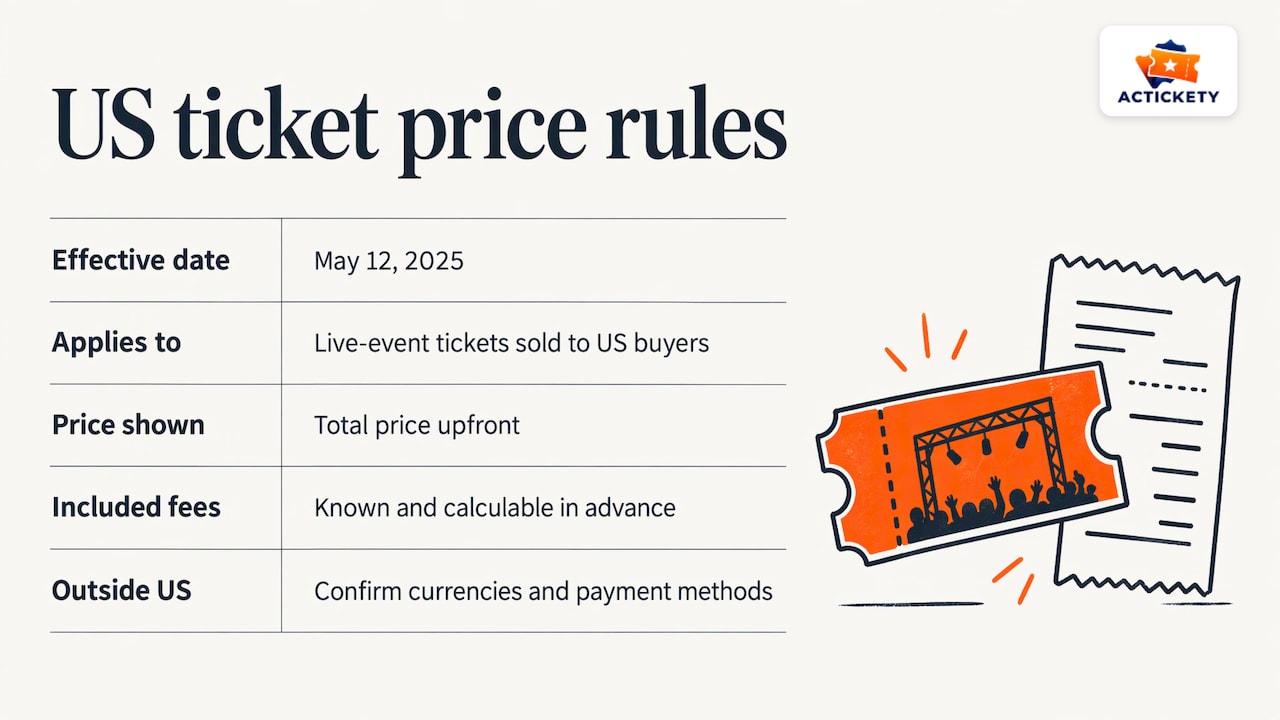
If you sell live-event tickets to US buyers, the price you show matters beyond marketing. The Federal Trade Commission's Rule on Unfair or Deceptive Fees took effect on May 12, 2025 and requires a business that advertises live-event ticket prices to show the total price upfront, including the charges and fees it knows about and can calculate in advance. A good platform makes it easy to show an all-in price at checkout. Check that yours does, because it protects your buyers and you.
Fees and rules differ by country, and so do payment methods and currencies. If your buyers are outside the US, confirm which currencies and payment methods the platform supports for your market before you build your event.
Own your data and your audience
Who owns the list of people who bought tickets? On many platforms, the answer is blurry. The platform holds the data, sends its own marketing to your buyers or limits what you can export.
That list is the most valuable thing your event produces. It is how a school fills next year's open day, how a charity thanks donors, how a band sells the next gig. When you compare platforms, ask:
- Can I export every buyer's name, email and order history at any time?
- Do I own that data, or does the platform have rights to it?
- Does my buyer see my brand or someone else's?
With Actickety you keep 100% of your event data. Our guide to community event ticketing shows how organizers launch in hours and keep the data they collect.
Match the platform to your kind of event
Charities and fundraisers. Every dollar lost to fees is a dollar not raised. Look for no platform fees on tickets, donation add-ons and merchandise in the same checkout. See fundraising event ticketing.
Musicians and online creators. You want a page that looks like you, a poster you can share the same day and a direct line to your fans. Read creator event ticketing.
Schools, colleges and universities. Open days, performances and fairs need simple setup, clear reporting and data you control.
Sports clubs. Open competitions and tournaments often need several ticket types and merchandise such as kit or programs.
Small businesses. Workshops and seminars are small but frequent. Zero upfront cost means you only pay when you sell.
Festivals. Multiple tiers, day passes and heavy gate volume make door-day tools and total cost the deciding criteria.
A decision checklist you can finish in an afternoon
- Write your ticket types, quantities and prices.
- Decide whether you sell merchandise and whether you need more than one day.
- Shortlist two or three platforms and calculate total cost per ticket for your numbers.
- Confirm who pays fees by default and what happens to fees on refunds.
- Confirm that you can export all buyer data at any time.
- Confirm how tickets are scanned and what happens without signal.
- Confirm that the checkout shows an all-in price.
- Confirm whether your page can carry your branding and your own look.
- Choose the option that lets you build the whole event before paying.
Our view: why we built it this way
We started Actickety because organizers kept sharing their success with ticketing giants. You do the work: the idea, the venue, the promotion, the crowd. Then a platform takes a cut of every sale and keeps the audience you built.
Our answer is simple. Building your event should cost nothing until you are ready to go live. You should be able to create a professional microsite, an eye-catching AI poster, your ticketing and your merchandise in ten straightforward steps. You should keep 100% of your event data. And ticket sales should carry no platform fees from us.
When you compare platforms, ask one question of each: who does this system work for? We built ours for organizers, not middlemen. Your event. Your revenue. Your rules.
Tim
Build your event on Actickety
Actickety lets charities, event planners, artists, community groups, schools, sports clubs and small businesses build an event microsite, generate an AI poster and set up ticketing and merchandise, with zero upfront costs until you go live. There are no platform fees on ticket sales, and your event data stays yours.

If you are ready to see your event take shape, start at actickety.com. To follow the full process from page to payout, read how to sell event tickets online, step by step.
FAQ
What is the best platform to sell tickets on?
The best platform is the one that fits your event type, shows the lowest total cost per ticket and lets you keep your buyer data. For community organizers, charities, clubs and creators, that usually means a platform with no upfront cost and no platform fees on ticket sales, like Actickety.
How much does it cost to sell tickets online?
It depends on the platform fee, payment processing and any add-ons, plus who pays them. Multiply your ticket price by your expected sales and compare the total for each option. On Actickety, setup is free until you go live and we charge no platform fees on ticket sales.
Do I need a ticketing platform for a small event?
If you sell tickets in advance, yes. A platform handles payment, tracks capacity, issues QR tickets and gives you a buyer list. For small events, speed of setup and low cost matter most, so choose something you can build in an afternoon.
Should I use a marketplace or my own event page?
If you run events regularly or have an audience of your own, your own page builds your brand and keeps buyers connected to you. An Actickety microsite gives you that page, with your branding and your data.
What should the checkout show buyers?
Buyers should see the total price, including mandatory fees, before they pay. For US live-event tickets, the FTC's fees rule has required this since May 12, 2025, so check that your checkout displays an all-in price.